I’m in the process of getting my Home Assistant environment up and running, and decided to run a test: it turns out that my gaming PC (custom 5800X3D/7900XTX build) uses more power just sitting idle, than both of my storage freezers combined.
Background: In addition to some other things, I bought two “Eightree” brand Zigbee-compatible plugs to see how they fare. One is monitoring the power usage of both freezers on a power strip (don’t worry, it’s a heavy duty strip meant for this), and the other is measuring the usage of my entire desktop setup (including monitors and the HA server itself, a Lenovo M710q).
After monitoring these for a couple days, I decided that I will shut off my PC unless I’m actively using it. It’s not a server, but it does have WOL capability, so if I absolutely need to get into it remotely, it won’t be an issue.
Pretty fascinating stuff, and now my wife is completely on board as well; she wants to put a plug on her iMac to see what it draws, as she uses it to hold her cross-stitch files and other things.
7 months later update:
I’ve expanded HA quite a bit and have a decent grasp on where my electricity is being used. Suspending my desktop has saved a shitload of power: under Linux, when suspended, it draws ~10W of power at any given time vs ~100W when idle. Also, I put smart plugs on the server cluster; the total usage of the entire cluster - 4 mini PCs, 1 SFF, and 5x HDDs (NAS) - over the last 7 months so far is currently at a whopping 465 kWh. That’s ~66 kWh a month. Barely 5% of my monthly electrical usage.
What kind of freezers are they? I hear that top loading freezers are quite efficient because the cool doesn’t escape when it gets opened like a front loading one.
One is a smaller chest freezer, about 3 feet tall, probably 6 or 7 cubic feet if I had to guess. The other is a Hamilton Beach upright freezer from Costco. Both are full, so that helps with keeping them cold.
Both are full so it reduces the amount of cold air that can escape when you open them.
Have you considered putting your gaming pc in one of the storage freezers? /s
Perfect, I don’t need to run the fans anymore!
Seriously though - we have 5 kids, and feeding the little shits is expensive, so we freeze a lot of things for storage. I thought for certain the freezers would be power hogs compared to an idling PC, but I was very surprised to be proven wrong.
Next up… Measuring my server cluster 😬
Measuring my server cluster
Personally, I just don’t ask questions I don’t want the answer to.
I know they’re gonna be a power suck lol. Three mini PCs, a SFF PC, 4-bay hard drive docking station, 8-port switch, and a RPi0w… Hoping for a max of 200W, but I suppose we’ll see what happens 🫤
Have you considered putting your children in one of the storage freezers? /s
👀
I discovered a similar issue. PC desk was using 8-9W when the PC was turned OFF! My power strip was taking a bit under 1W (the little light, old), two smart bulbs as well but I’ll allow those losses. An older Logitech speaker setup (2+1) was taking 6-7W, turned off! Crazy… and illegal if it were made today (in EU). So this is completely wasted energy in my opinion… started disconnecting the whole desk now.
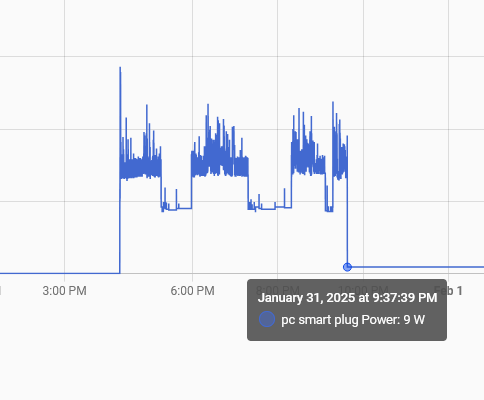
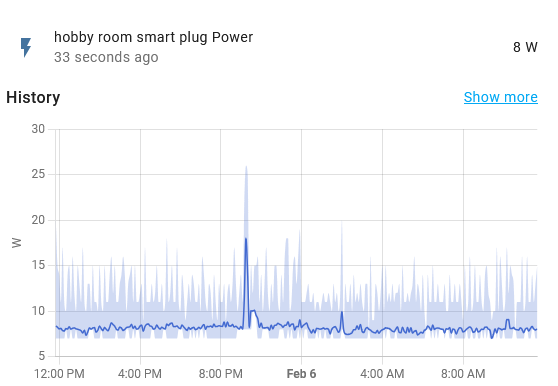
For comparison, my home server is averaging 7-8W, turned on all the time:
I also learned that PC’s draw a lot of power lol. I used to sit on my PC all day, now I know how much it cost. Even the monitor turning off splits the power draw by half.
Older speakers like that use always on transformers, constantly wasting energy to keep the core energized. You’re correct those cannot be made any more, they must use efficient switch mode supplies.
I also learned that PC’s draw a lot of power lol. I used to sit on my PC all day, now I know how much it cost. Even the monitor turning off splits the power draw by half.
My state has a green energy initiative that gives us free home energy audits, mostly it means we get a lot of free led lights. But it also got us these nice automated power strips, you plug one item (the pc) into a control socket, and when that device turns off, it cuts power to the other managed sockets (monitors, speakers, etc). A really simple solution that must save a bunch of power.
monitors
Don’t underestimate the power draw of multiple monitors.
But while you’re at it: simply turn off different devices on the same power strip and check what actually draws how much.
The PC itself was drawing ~90 watts. The current draw right now - dual 1080p monitors, HA server, a 5-port switch, and a couple other small things - is about 12 watts. Desk power measurement is the yellow line, freezers are the blue line.
If I’m reading that correctly, that shows the system is drawing around 100W just sitting idle.
Something is not right there.
Either the power meter is way out of calibration, or there is a configuration issue with your PC. Maybe you have a performance setting that is causing the CPU and GPU to not idle down ever? Or a rogue antivirus software that is cranking the CPU constantly?
Are there any spinning disk hard drives in your PC? They can sometimes use around 5W each on idle. That was the biggest cause of idle power consumption on my old xeon server, with 8 HDDs.
PSU choice can also affect it. Eg, if you buy into marketing and buy a monster 850W PSU, but it’s idle all the time and only uses 450W under load, then the PSU is spending the whole time outside it’s efficiency curve, and can end up causing more power draw than expected.
That’s nothing; my Ryzen 7000 machine uses 150w at idle. Modern high-end desktops draw a lot of power.
It’s ~90W at idle; the plug is monitoring everything at my desk. No spinning rust, all solid state. Settings for CPU and GPU are all default at the moment. It does have an 850W PSU, but I’ve had it pulling over 700W at one point (dimming my bedroom lights), so that’s somewhat justified 😅
I’ll dig into settings later, but for now I’m good just turning it off unless I’m using it.
(dimming my bedroom lights)
Thats terrifying. Your desk outlet should not share a circuit with your bedroom lighting circuit, that makes no sense (unless you’re talking about a desk lamp).
And regardless, if a 700W load can make your lights dim, then there’s a major wiring issue in your house. Don’t plug in an electric cooker, kettle, or space heater until you get that checked out.
The bedrooms, including my entire master bedroom suite, each have one 15A circuit. No more. That’s how most duplex townhouses are. The lights are currently those damn CFL lights, so they aren’t exactly difficult to dim - CFLs almost do it on their own when they’re close to dying (which these ones are).
That, and it’s a rental house.
Major issue lol short circuit or too thin of wire/breaker, old house probably. Instant dim and back to normal turning on a heavy appliance can happen as the power circuit lags but it’s a mere fraction of a second.
So to turn on an appliance I’m pretty sure it takes 3000 watts to cycle on then reduces to say 1500 watts to operate a normal 1500w appliance. Nothing should ever continuously dim lights. Major fire hazard if so.
Most rented bedrooms in my area dont even have built-in lighting. Its all floor and table lamps, usually on a smart outlet these days
Cool!
Just be cautious that you don’t over-optimize for power. I ran around my house w/ a Kill-a-watt meter checking everything and made some tweaks, and I still don’t think it has paid for itself since power costs are so low here ($0.12-0.13/kWh, so 10Wh 24/7 < $1/month), and some of the things I tried doing made my life kinda suck. So I backed off a bit and found a good middleground where I got 80% of the benefit w/o any real compromises.
For example, here’s what I ended up with:
- put desktop to sleep - power draw is negligible, and I don’t need to keep typing my FDE password to use it
- “upgraded” NAS from old 2009 HW to my old gaming PC HW (1st gen Ryzen) - cut power draw in half, but I had to buy some RAM; will take years to pay off w/ electricity savings, but it has much better performance in the meantime
- turn off work laptop - was drawing ~20W; I WFH MThF, so I leave it on Th night for convenience, but have it sleep M-W and turn it off Friday
I could probably cut a bit more if I really try, but that would be annoying.
Yeah, my power bill is pretty reasonable already, considering my large family plus all the electronics I run. I just like seeing what everything is doing as a matter of curiosity.
Oh yeah, as a hobby, it’s absolutely fun. I like tinkering with all kinds of things.
My point was to just be careful since it’s not necessarily going to be worth the expense and time.
I’ve been considering getting a breaker-level power monitor to watch for spikes. It’s a bit more expensive (hundreds of dollars), but it measures the types of things I’m interested in. My kid flipped on our gutter heaters (I never use them) and shot our electricity bill to the moon for a couple months until I noticed. If I had a home energy monitor, I would’ve noticed a crazy energy spike and that might have paid for itself.
Yeah, I never expect a financial ROI for hobbies; the ROI for that is nothing more than my own enjoyment.
It will help some, and will also help temps, but AMD hardware does well with undervolting, especially the 5800X3D. I undervolt mine, and read the consensus that - 30 across all cores should be achievable for anyone, unless they’re really, really unlucky. My 6800 XT I also only run @ 92% Voltage, and it runs cooler and faster now, too.
Definitely gonna check that out.
The CPU was done in BIOS on an ASUS x570. For me it was under AI Tweaker > Precision Boost Override > Curve Optimizer.
The GPU was done in the driver software on Windows. Or LACT if on Linux.
I recently bought a Mac Mini because music production on Linux had me fighting my tools more than using them. My Linux box is a 7800x3d/7800xtx. The Mini idles at 4w, while the 78000xtx alone idles closer to 50w. I use the mini for everything non-gaming now.
I had a similar revelation. Home assistant has a WOL component, so you can set that up for easy starts. I’ve had mixed success with mechanisms to get HA to sleep the computer, though.
Ideally I want the machine to be sleeping I’d I’m not using it.
I use Kasm for remote access, I believe that has a WOL component as well. I haven’t set it up as such, but I plan to later on.
If you get a reliable way to sleep a windows machine via MQTT (not sure if that’s a route you’d take) but I’d be super interested in hearing about it.
That’d be interesting, but I don’t plan to integrate my PC that deeply into HA, if at all.
Yeah, I’ve actually been pretty disappointed as of late with the power consumption of my custom PCs. I actually can’t remember the last time I had a PC with sleep states that actually work, maybe it was 8 years ago?
On my last motherboard, whenever you woke the machine from sleep, some board modules wouldn’t power up correctly, you had to restart to get full functionality again. I have a second PC as a home media server, that one never fully wakes up from any sleep state (luckily it’s a server, so it’s always on). My current gaming PC regularly crashes whenever the machine is (ironically) at low processor load. (That’s the amd automatic energy saving features totally failing)
I don’t know whether to blame the motherboards, the processors, or the OS, but any way you slice it, my computers are only happy if they’re consuming 300 watts all the time…
And on the other hand, I gather chest freezers are actually decently efficient.
Chest freezers are very efficient. Ours is usually full, so it stays nice and cold unless you leave it unplugged for like a week straight.
I am curious to see what the PC’s power usage looks like when I switch to Linux…
100W while idling seems like way too much?
Edit: maybe not, they list 75W for whole system idle here with 5800X3D.
What res is that monitor ? My 2k monitor is pretty hungry compared to my old 1080. Even just looking at the uk energy efficiency ratings for 4k tells shocks me !
Right now I just run dual 1080p. I plan on upgrading to a 120Hz+ 1440p ultrawide at some point, but priorities… My entire desk setup is currently consuming 12 watts with the PC shut off. That’s ~90W just from the PC.
So my partner and I use laptops (small flat) so really sip power compared to the 65 watt of the monitor
Very nice. I don’t like laptops for gaming, but I recognize and appreciate the utility of them; I use my laptop (Thinkpad T14 G1 AMD) more than my gaming PC for most things outside of that.
I got a UPS cause the breaker to my room likes to trip if I am gaming and someone in the house decides to microwave something for 10 minutes. My desktop, three monitors (2x1080p 60hz + a 1440p 144hz) and my 3d printer all running at full tilt will suck my 1500w UPS dry in about 2 minutes lol.
If I’m not gaming and say just watching YouTube while not 3d printing anything that same UPS can run for almost 15 minutes.