- 12 Posts
- 23 Comments
lent9004@lemmy.worldOPto
Selfhosted@lemmy.world•Youlag (v4.1.0): Modernize FreshRSS for viewing YouTube and articlesEnglish
3·5 months agoThanks for letting me know, I’d love to get this working for as many people as possible, so please let me know if you got any leads.
lent9004@lemmy.worldOPto
Selfhosted@lemmy.world•Youlag (v4.1.0): Modernize FreshRSS for viewing YouTube and articlesEnglish
5·5 months agoThat’s odd, and you made sure that video mode for "All pages and categories " is unchecked?
If you’re not on the latest version of FreshRSS, perhaps try updating? During development and testing, I’ve always stayed with the latest version.
lent9004@lemmy.worldOPto
Selfhosted@lemmy.world•Watch videos in FreshRSS like it's YouTube: "Youlag" extension (v4.0.3)English
2·6 months agoYoulag doesn’t come with the core FreshRSS, it’s an extension you need to manually install. You can follow the install instructions here to learn how to install Youlag. It’s the same method that you use to install any other third-party extension for FreshRSS.
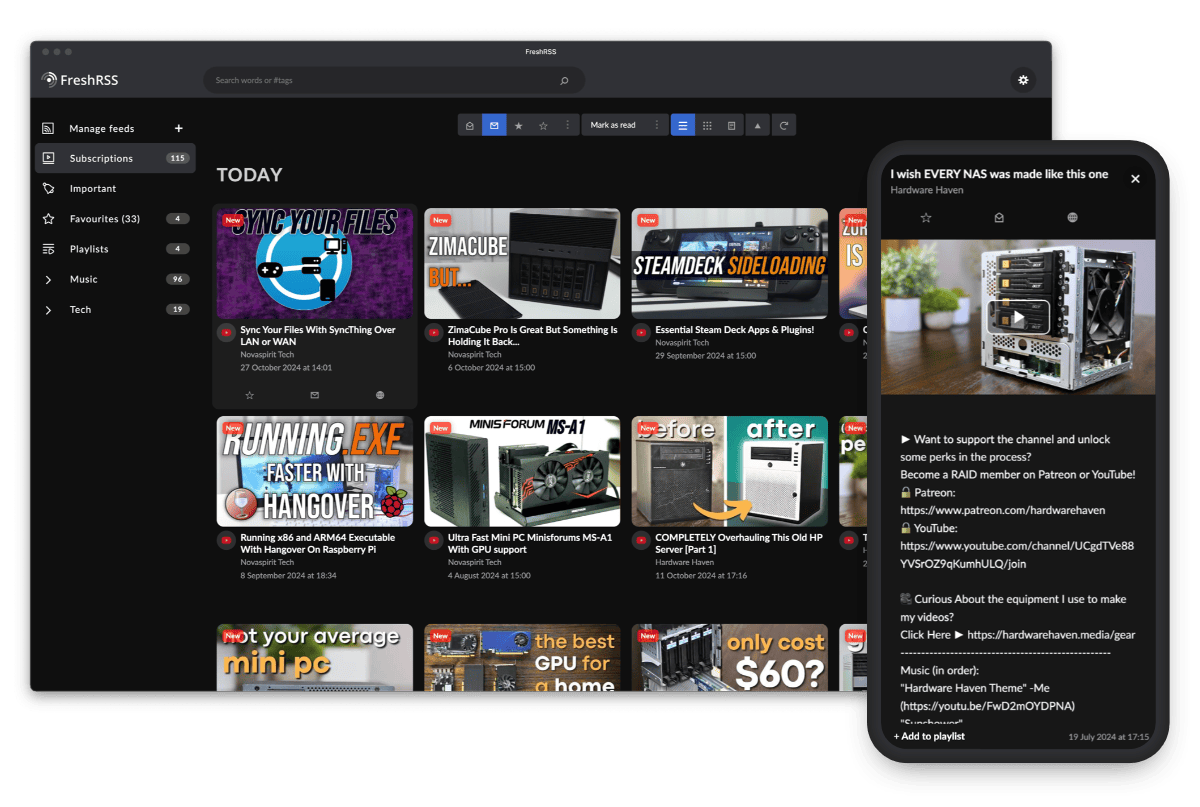
Once installed, the extensions page should look like this:

lent9004@lemmy.worldOPto
Selfhosted@lemmy.world•Watch videos in FreshRSS like it's YouTube: "Youlag" extension (v4.0.3)English
2·6 months agoJust to double check, is the Youlag extension enabled in “Settings -> Extensions”?
The view you described sounds like what FreshRSS would look like if Youlag isn’t enabled.
lent9004@lemmy.worldOPto
Selfhosted@lemmy.world•Watch videos in FreshRSS like it's YouTube: "Youlag" extension (v4.0.3)English
2·6 months agoIf you’re thinking of SponsorBlock, Youlag doesn’t support that feature. In this recent comment, I’ve shared why that is the case.
For traditional adblocking, I would suggest using uBlock Origin, which is also available on Android for firefox-based browsers.
Edit: To clarify, there are no adblocking features built-in to Youlag.
lent9004@lemmy.worldOPto
Selfhosted@lemmy.world•Watch videos in FreshRSS like it's YouTube: "Youlag" extension (v4.0.3)English
1·6 months agoI don’t use Grayjay myself, but I tried it a long time ago, so this what I recall.
Grayjay uses a web scraper to feed the stream into its own video player, which lets them add features such as timestamp, SponsorBlock, and background playback.
Youlag is less sophisticated as it’s solely a client‑side approach that embeds the official YouTube player. If you however add your own Invidious instance via the Youlag settings, you can play it through Invidious instead.
With Youlag in FreshRSS, everything runs in the browser, so there’s no device syncing needed. That also means it even works on iOS devices, and essentially anything that can run a modern browser.
lent9004@lemmy.worldOPto
Selfhosted@lemmy.world•MAZANOKE v1.1.5: Self-hosted local image optimizer in your browser — now supports TIFF, ICO, basic auth (featured on Tailscale, LINUX Unplugged, Selfh.st)English
2·1 year agoTo preface a bit. I occasionally run my images through Sharp over CLI, and I am also a daily user of the Caesium desktop app. However, I haven’t explored the details of how Caesium is implemented.
The biggest difference is that MAZANOKE targets a different user group, essentilly those who would use online tools over installing applications, which is something you see more of these days. I wanted my family and friends to have a safe drop-in replacement for those shady websites. For those who want to use a “native app”, installing MAZANOKE as a PWA is also a great option.
In terms of core functionality, they are very similar and support the same output image formats. But at the end of the day, MAZANOKE is privacy-focused too, and have plans to add a simple image editor for obfuscation, cropping, and related features. You can also access MAZANOKE anywhere, whether it is self-hosted or on the official instance.
Fundamentally, MAZANOKE relies heavily on the device, and the browser’s Canvas API. This means that the speed and quality could slightly differ depending on which device/browser you use. I believe Caesium’s performance would be more consistent.
(I didn’t know where to put this, but my favorite feature is being able to paste to compress an image right away using MAZANOKE.)
Edit: typo
lent9004@lemmy.worldOPto
Selfhosted@lemmy.world•MAZANOKE v1.1.5: Self-hosted local image optimizer in your browser — now supports TIFF, ICO, basic auth (featured on Tailscale, LINUX Unplugged, Selfh.st)English
1·1 year agoThe unofficial unraid template was graciouslly provided by ctrlaltd1337ed, but I appreciate the sentiment.
About the name, It is an amalgamation of two words, I’ll leave the rest to your imagination!
lent9004@lemmy.worldOPto
Selfhosted@lemmy.world•MAZANOKE v1.1.0: Self-hosted local image optimizer in your browser — now supports HEIC, clipboard paste, and moreEnglish
2·1 year agoAs a Lemmy user myself, I totally get the sentiment. GitHub isn’t ideal, and I had also considered Codeberg in the past (not for this project, but way back for others). Unfortunately, the simple reason is that the community is already on there, which makes getting contributions and engagement much easier. Managing and tracking issues across two platforms would be quite (mentally) taxing, which is on top of the effort already going into developing the app.
lent9004@lemmy.worldOPto
Selfhosted@lemmy.world•MAZANOKE v1.1.0: Self-hosted local image optimizer in your browser — now supports HEIC, clipboard paste, and moreEnglish
1·1 year agoI’m glad to hear it’s being used frequently! I’ve heard a similar, but not exactly the same use case, so I recommend submitting a feature request on GitHub. That way, I can review it later to assess if the feature could be included when I plan ahead for new releases.
lent9004@lemmy.worldOPto
Selfhosted@lemmy.world•MAZANOKE v1.1.0: Self-hosted local image optimizer in your browser — now supports HEIC, clipboard paste, and moreEnglish
1·1 year agoIf you get around to it, I’d love to know about it and add that as a feature.
lent9004@lemmy.worldOPto
Selfhosted@lemmy.world•MAZANOKE v1.1.0: Self-hosted local image optimizer in your browser — now supports HEIC, clipboard paste, and moreEnglish
3·1 year agoThe conversion option “Default” is meant to retain the file format when possible, but you can actively select the other options like jpg or webp if that fits your use case better.
lent9004@lemmy.worldOPto
Selfhosted@lemmy.world•MAZANOKE v1.1.0: Self-hosted local image optimizer in your browser — now supports HEIC, clipboard paste, and moreEnglish
5·1 year agoCurrently, only SVG to PNG is supported. SVGOMG is a great tool I’ve used many times as a user, but since it runs as a Node.js app, it would require server-side processing, unlike the local browser-based approach of this app.
lent9004@lemmy.worldOPto
Selfhosted@lemmy.world•MAZANOKE v1.1.0: Self-hosted local image optimizer in your browser — now supports HEIC, clipboard paste, and moreEnglish
10·1 year agoIf I understand it correctly, then yes, that’s the case! I’ve utitlized several libraries such as “Browser Image Compression”, “heic-to”, and more, to wrap it in a web interface.
lent9004@lemmy.worldOPto
Selfhosted@lemmy.world•MAZANOKE update (image optimizer via browser): Batch upload and downloadEnglish
1·1 year agoOh wow, thank you for taking the time creating the feature requests/issues. I just finishing replying to them.
I’ll give the workflow another think and see if it fits within the project as a whole.
lent9004@lemmy.worldOPto
Selfhosted@lemmy.world•MAZANOKE update (image optimizer via browser): Batch upload and downloadEnglish
4·1 year agoEven though this squoosh instance seems to be selfhosted, it has Google Analytics tracking (since Google made this app). MAZANOKE does not include any tracking nor require any internet connection at all if you install it as a PWA.
Edit: Looked at the source code of the fork, and it is applying the same tracking ID (to the big G). As squoosh is apache2 licensed, from my understanding, they should be able to simply remove that off the fork?
lent9004@lemmy.worldOPto
Selfhosted@lemmy.world•MAZANOKE update (image optimizer via browser): Batch upload and downloadEnglish
1·1 year agoHaha, very interesting scenario, glad it worked out well!
lent9004@lemmy.worldOPto
Selfhosted@lemmy.world•Browse and watch videos in FreshRSS like it's YouTube: "Youlag theme/extension" (v3.0.2)English
2·1 year agoAt the moment, I haven’t integrate Youlag with FreshRSS as a full fledge extension, but once that is in place, it would be possible to store user preferences. While it requires time and effort, I believe it shouldn’t be too hard to implment this feature.
lent9004@lemmy.worldto
Selfhosted@lemmy.world•What’s the newest way of watching YouTube?English
4·1 year agoAddressing the subscribing part; I had similar requirements, so I started subscribing via FreshRSS while using a custom theme to give it a YouTube-like experience.
I shared the setup a few month ago here: https://lemmy.world/post/21381606
Edit: One of the benefits of using selfhosted RSS with a web interface is that it is platform agnostic.

I was actually contemplating if I should’ve omitted the mention of Invidious, seeing how it is a niche feature, but I guess it was the right call to keep it.